How to mirror a dance video on iPhone
A tutorial filmed facing you puts their left on your right. Flip the video and you can simply follow. There are two ways to do it on an iPhone.
Why mirror it
When a teacher faces the camera, every move reaches you reversed: they step to their left, and on your screen it goes right. You can translate in your head, but that is attention taken away from the move itself.
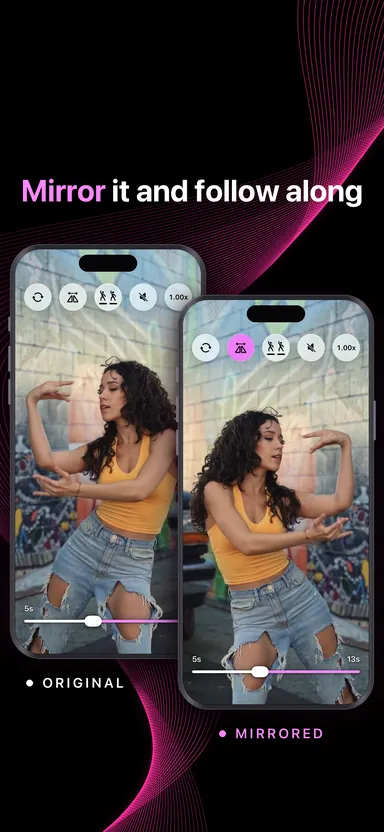
A mirrored video works the way a mirror does. What moves to the left of the screen is what you move to your left, so you copy what you see.
In Photos, with nothing to install
- Open the video in Photos and tap Edit.
- Choose Crop.
- Tap the flip button — two triangles with an arrow over them — then Done.
That changes the video in your library. It stays flipped everywhere until you edit it again and flip it back. Fine for one clip you will only ever want mirrored; clumsy when you want to check it against the original, or when you have a dozen tutorials on the go.
In MoveLens, in one tap
- Bring the video in from Files, from Photos, or by pasting it from the clipboard.
- Open it and tap the mirror button.
- Tap it again to see the video the way it was filmed.
The video is flipped as it plays. The file is never changed and nothing is saved again, so going back and forth costs nothing.
When not to mirror
If the tutorial was filmed from behind, leave it alone: you are already facing the same way as the dancer. The same goes for one the creator mirrored before posting, which many say in the caption. Flipping either puts you back where you started.
A quick check: writing or a logo in the shot reads backwards in a video that has already been mirrored.
Then slow it down
Mirroring fixes left and right; it does not make a fast move any slower. Slow the video down until you can see what is happening, and when you have it, play your own run beside the original.